

Wander Trip AI
Design Sprint
This is not a travel planning platform.
It is an AI system that designs trips based on who you are and what you emotionally need right now. Wander Trip AI's core value proposition lies in the fact that it is not a cold tool, but a “digital travel companion” that provides decision support based on your emotional state and personalized traits.
Timeline: 1 week (December 27 ~ 31, 2025)
Project Type: Individual GV Design Sprint
Role: UX designer, researcher
Tools: Figma, Miro
Project overview
WanderTrip AI is a one-stop travel planning platform powered by NLP and prompt engineering. It enables users to input minimal requirements and generates a complete, actionable travel framework based on their profile characteristics. While reviewing the generated itinerary, the platform continuously monitors real-time weather, traffic conditions, and attraction congestion levels, offering alternative Plan B options. Users can also customize the route within the existing framework by adding points of interest based on recommended local cuisine or iconic architecture along the route, or removing locations that no longer appeal.
Approach
A typical GV Design Sprint generally spans a five-day period and involves roughly 6-8 people. For this exercise, I was working alone so I conducted a moderate amount of work every day to create the minimum viable product. This five days immersive working experience helps me focus on the problem I am solving and move fast from one phase to the next.
Day 1
Target
Day 2
Sketch
Day 3
Decide
Day 4
Prototype
Day 5
Test
Day1 Target
Research
Competitive research
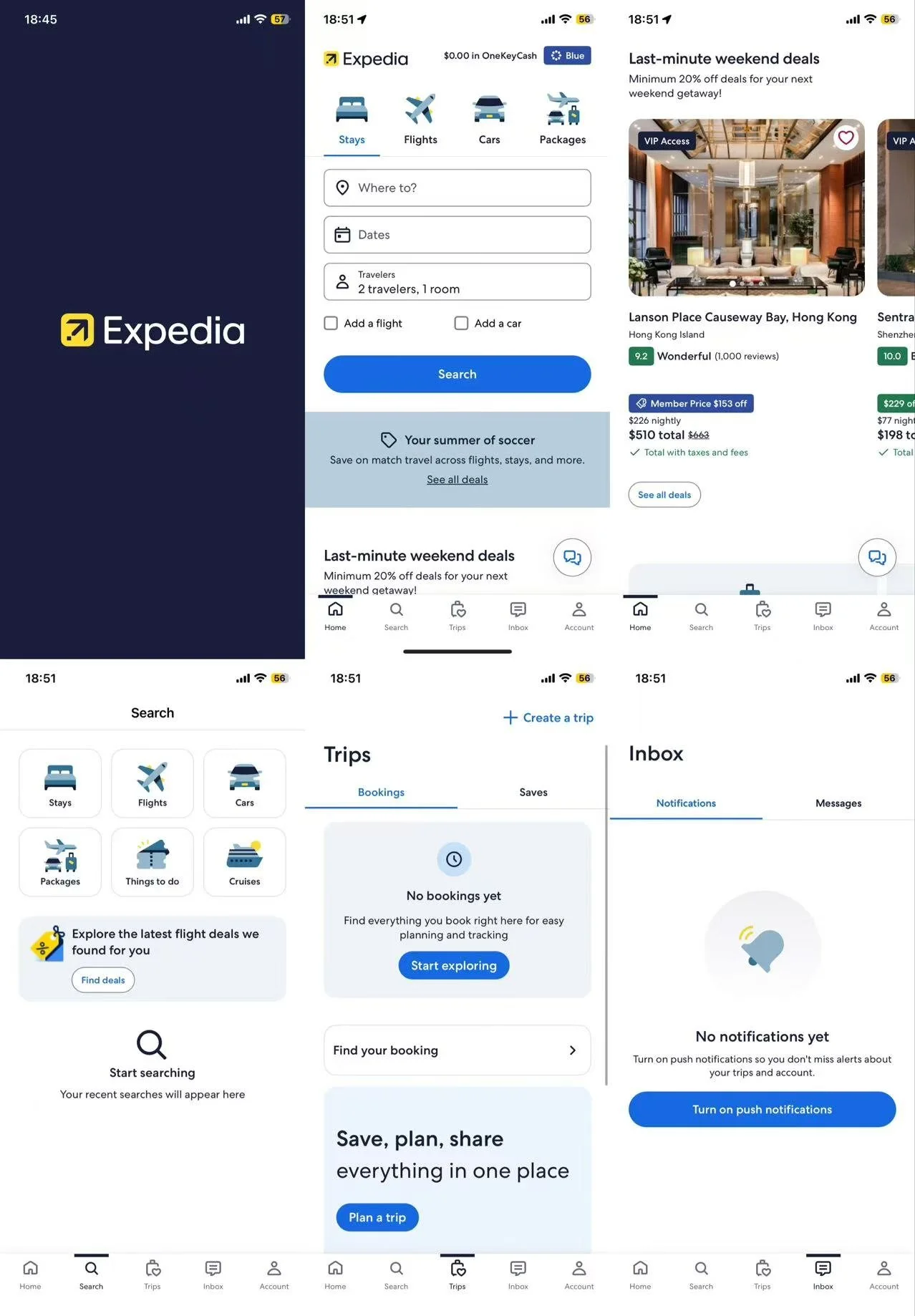
Before sketching out solution concepts, I conducted a brief lightning-round presentation of similar products that could potentially address this issue. I captured several highly insightful screenshots of thought processes and page layouts to serve as inspiration, helping me advance my own solution design. In the realm of travel planning tools, Google Map, Hopper, and Expedia are three highly representative apps.
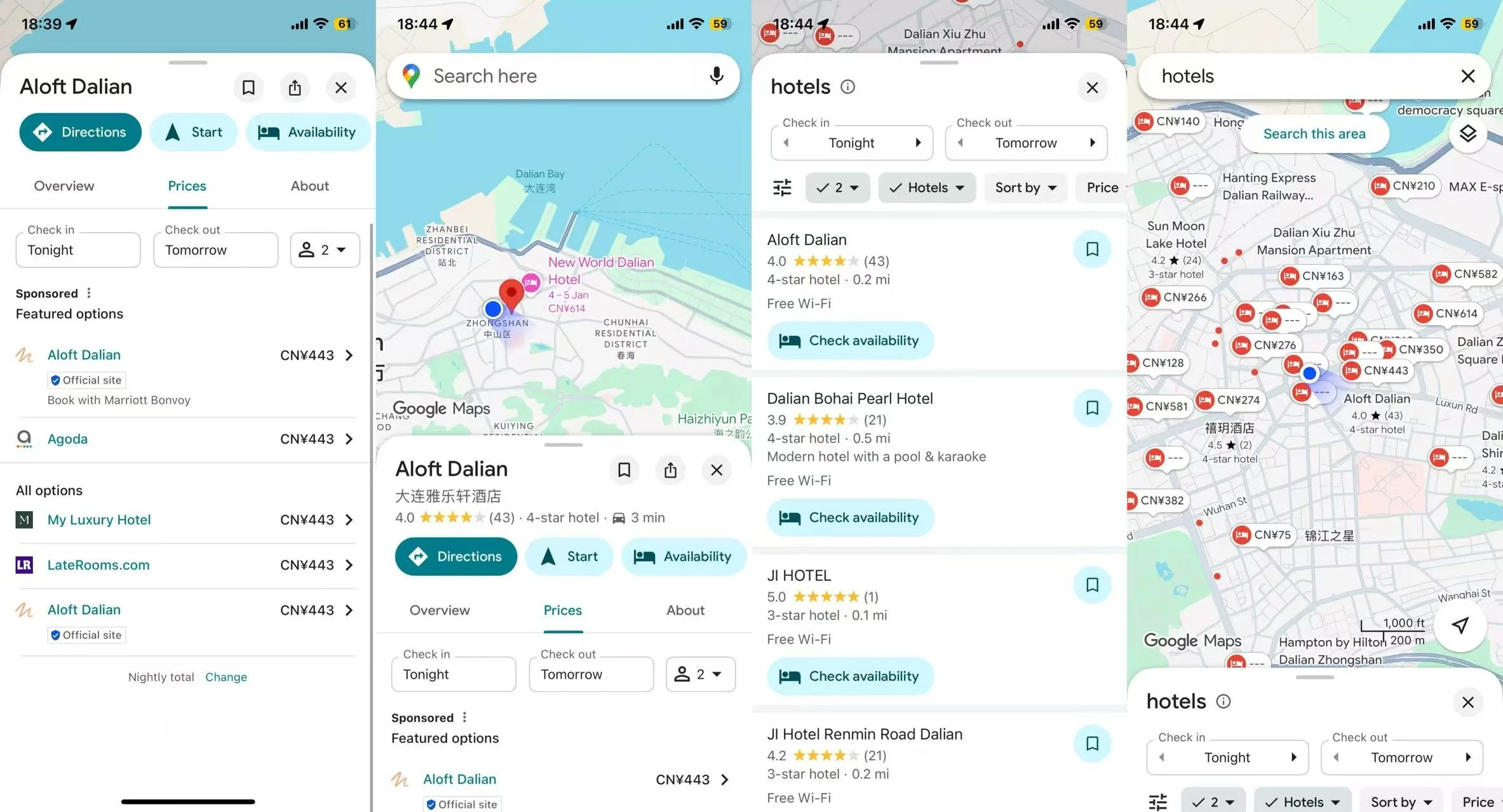
Google Map
Google Maps, Hopper, and Expedia are the three major players in the travel planning software space. All three integrate AI technology, but each focuses on different aspects.
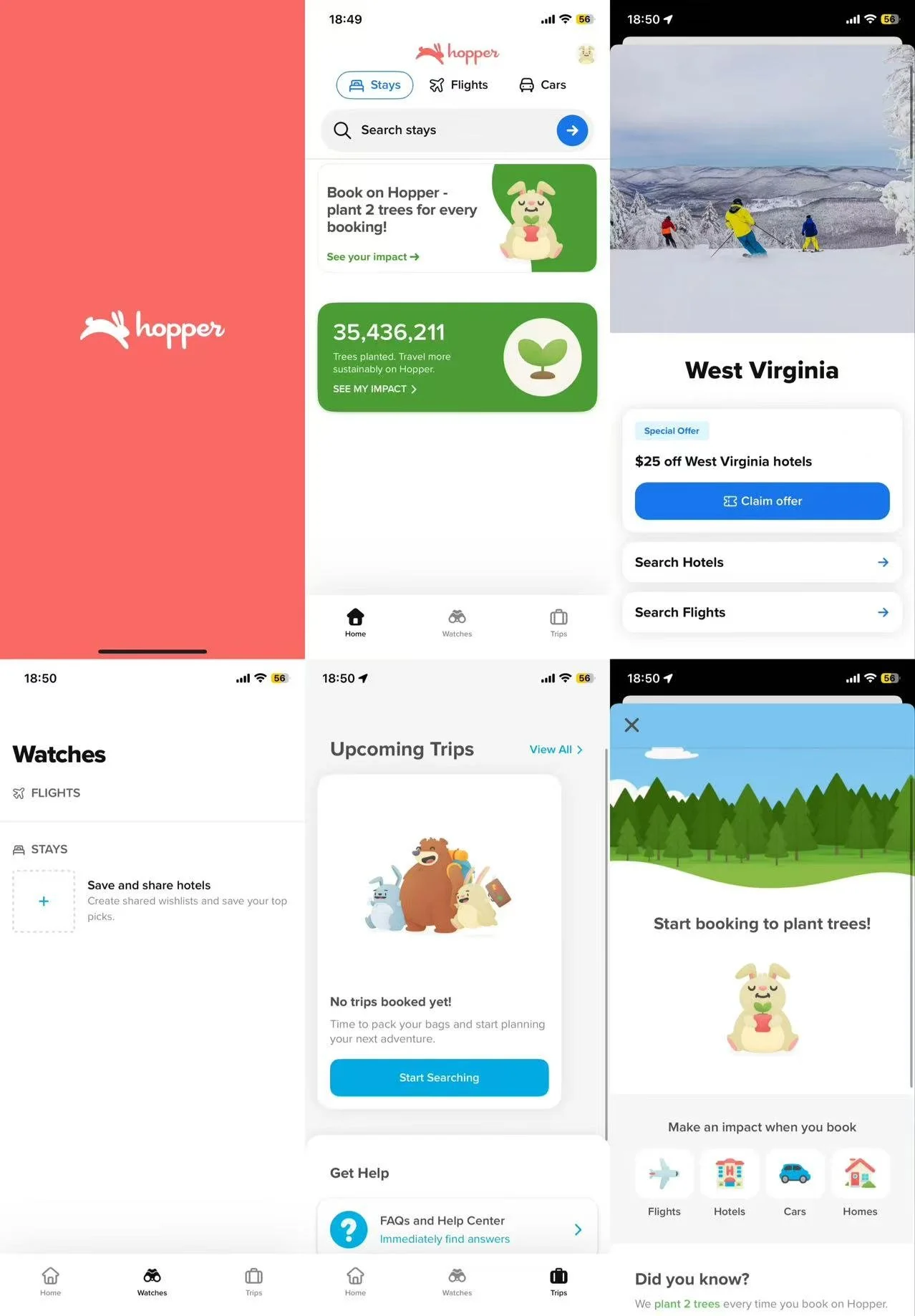
Hopper
Expedia
Google Maps emphasizes map navigation and real-time experiences.
Hopper focuses on price prediction and flexible booking.
Expedia highlights comprehensive itinerary building and personalized recommendations.
Google Maps, Hopper, and Expedia, as travel planning tools, share multiple core functionalities despite differing focuses. These commonalities primarily revolve around AI-empowered travel decision support, guiding users from inspiration to execution.
AI-driven personalized itinerary planning and recommendations.
Real-time data integration and dynamic adjustments.
Search and exploration capabilities.
Booking and payment support.
User interaction and assistant features.
These functionalities collectively serve a central purpose: simplifying decision-making and enhancing efficiency. Consequently, my app is built upon these core capabilities, aiming to extract value from big data and deliver a user-centric experience.
In this era of information overload, travel planning has become another form of “overtime work.”
While existing giants (Google Maps, Hopper, Expedia) are powerful, they primarily handle “information” rather than “decision-making.”
Through research with frequent travelers—particularly those with order-seeking “J” personalities—I discovered that users' real pain points aren't a lack of destinations, but rather “choice paralysis” and “the gap between reality and expectations.” Our goal is to build itinerary resilience that can adapt to sudden weather changes or crowds, thereby safeguarding travelers' emotional experience.
Whose problem am I solving for?
Throughout the design process, I continually revisited these user characteristics and pain points to remind myself who I was designing for, ensuring my solutions addressed the right issues.



User Profile:
Frequent travelers
“J” types who need a checklist to execute plans
Individuals who struggle to explore new places
People passionate about discovering new places and experiences
Individuals who enjoy sharing experiences and browsing others' social feeds
Pain Points:
Different groups have varying travel needs, leading to disagreements
Weather-related delays or cancellations
Lack of familiarity with the local area
Discrepancies between online information and physical reality, causing disappointment
Need to search for information across multiple platforms
Transforming abstract needs into four tangible life scenarios:
Scenario 1: Seeking uniqueness. She doesn't want to follow the crowd on group tours; she needs personalized recommendations tailored to her preferences.
Scenario 2: Navigating the Unknown. When rain hits Kyoto, the AI proactively asks if she'd like to switch outdoor activities to indoor ones.
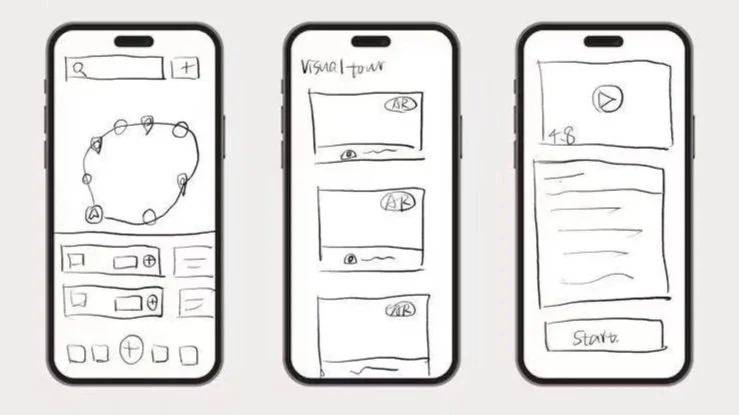
Scenario 3: Discovering Hidden Gems. Even on planned routes, she wants to stumble upon nearby treasure cafes anytime.
Scenario 4: Sense of Control. Financial management and trip reviews give her psychological reassurance.
Problem statement
How might we help travelers craft an itinerary that delivers an exceptional travel experience.?
Ideation
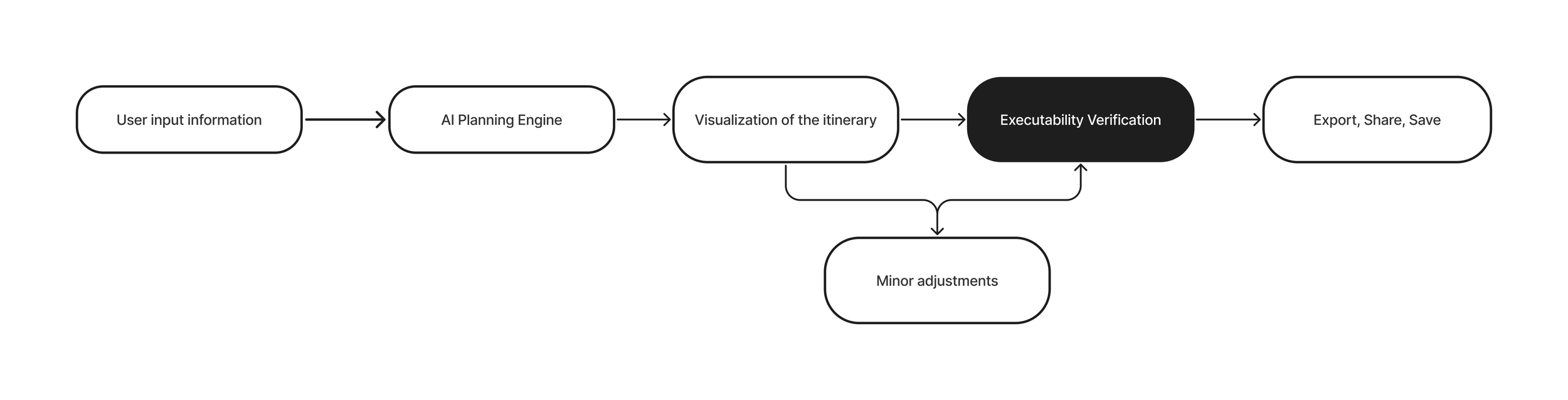
Based on my interviews with four users and the user pain points outlined above, I have sketched out a preliminary user experience map for Wander Trip AI.
Day2 Sketch
Sketch Solutions
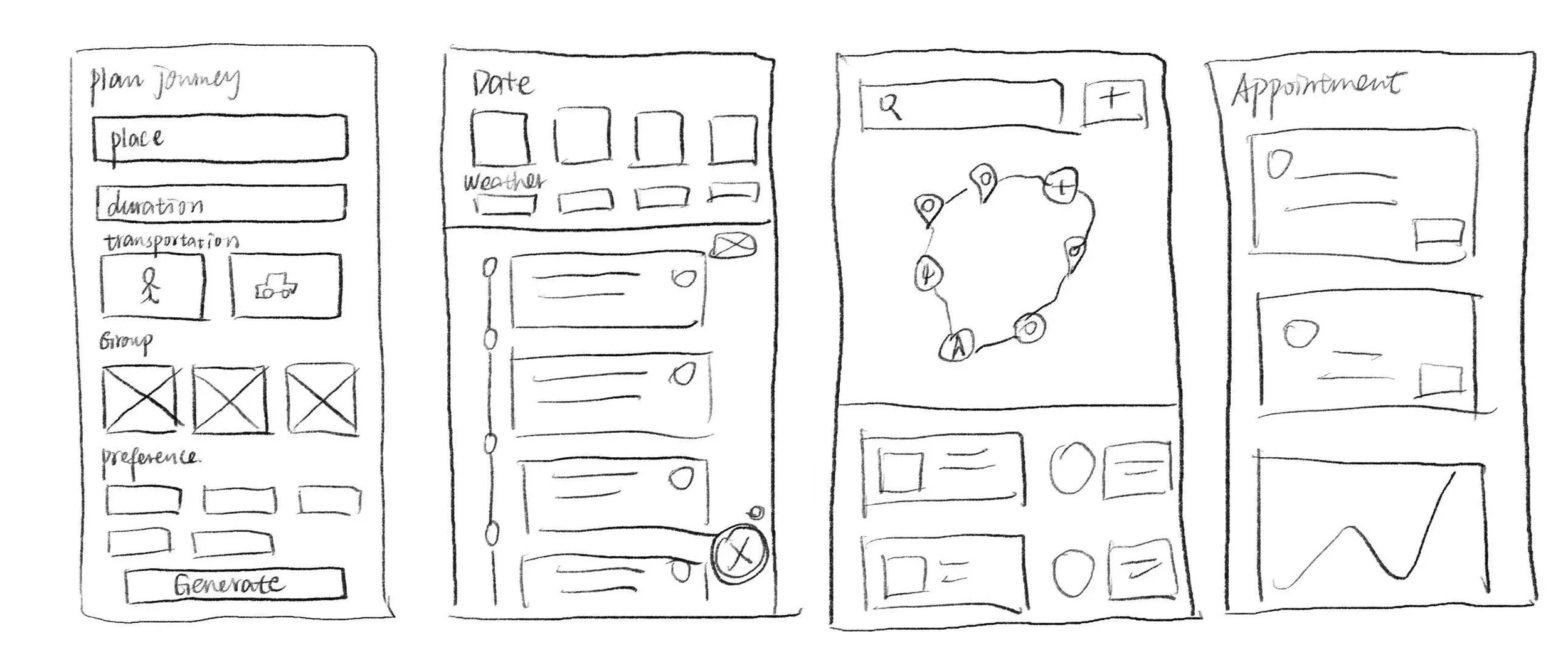
After having defined users’ needs and inspired solutions in mind, I started sketching by using the method called “Crazy 8“. Basically, I rapidly sketched 8 variations of the most critical screen within 8 minutes. I repeated this process for all the screens I could think of. This process allows me to generate different solutions quickly and decide on the best solutions.
Day3 Decide
User Scenarios
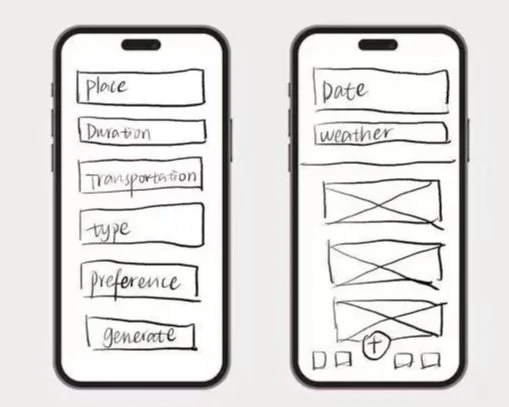
After sketching the most frequently used interfaces and refining solutions through iterative iterations, I began making decisions based on different life scenarios of the user persona. Focusing on resolving her pain points, I continually asked myself “How might we...” questions to determine the user flow and final interface solutions.
Scenario 1
Jiaxian wanted to travel to Kyoto, but she didn't want to spend money on offline tour groups. The itineraries others planned were either too demanding or didn't allow for a truly enjoyable experience. She wanted to create a travel guide tailored entirely to her own preferences.
Flow1 Enter your personal preferences, travel duration, and travel style to generate a preliminary itinerary based on this information.
Scenario 2
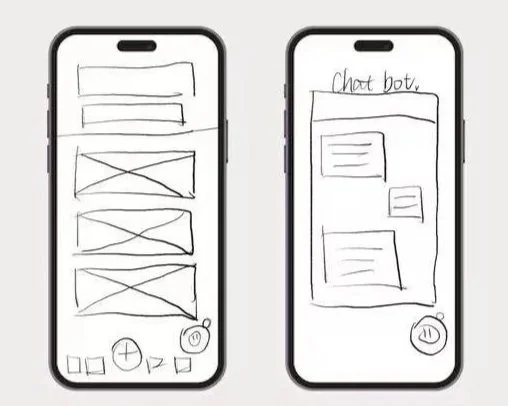
Jiaxian reviewed the travel itinerary generated by the algorithm. The real-time weather forecast indicated rain was possible the following morning. The AI travel manager inquired whether Jiaxian wished to switch tomorrow morning's outdoor activities to indoor alternatives.
Flow2 Monitor weather conditions to provide users with alternative travel options, ensuring a seamless user experience.
Scenario 3
Jiaxian wants to understand his daily focus levels and obtain an intuitive visualization of the data to improve his next task list arrangement.
Flow3 Jiaxian wants to know what unique local snacks, picturesque photo spots, or cafes are near his travel route that day.
Scenario 4
Jiaxian planned to review the hotel and flight details, then examine the spending for the past few days to allocate the budget more reasonably for the upcoming period.
Flow4 Store hotel and flight reservation details, track expenses, break down spending components, categorize travel expenditures, and visualize them.
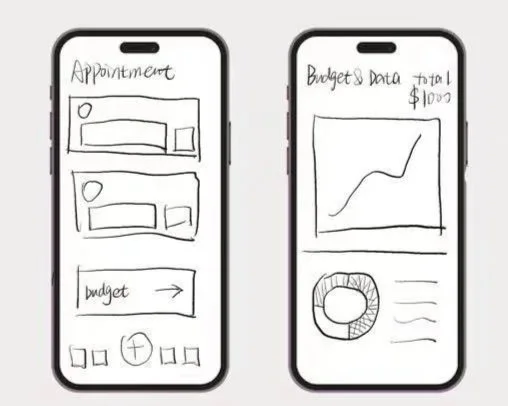
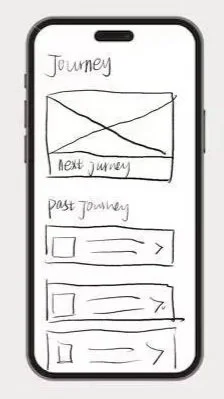
Flow5 Save travel plans that have been adopted and those that have been implemented, and create travel timestamps.
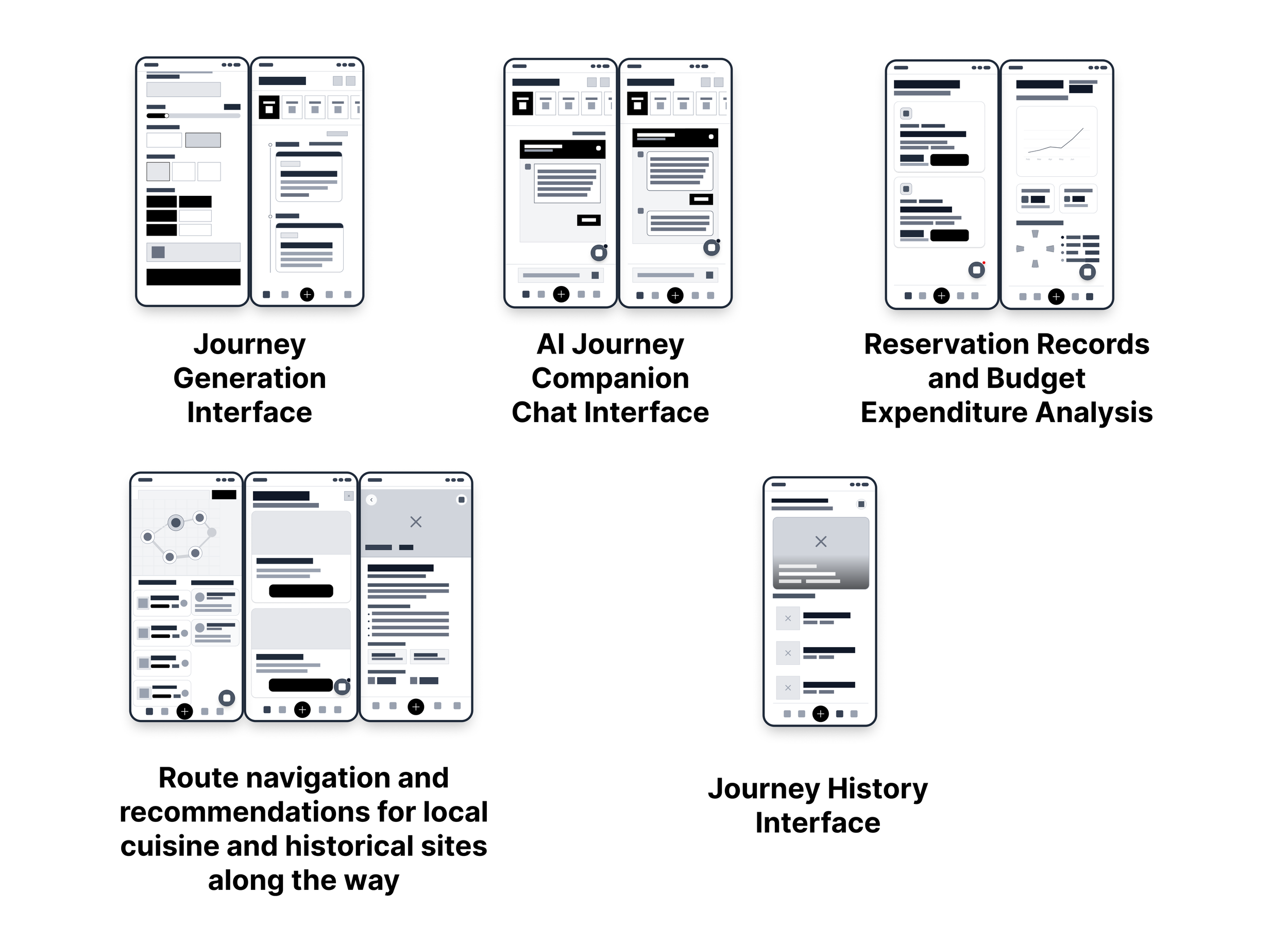
Lo-fi prototype
User scenarios and sketches helped me define the core features of Wander Trip AI. Building on this foundation, I began creating a low-fidelity prototype.
Testings
I conducted six remote tests via the Tencent Meeting platform. I specifically selected participants from target user groups who had used Google Maps, Hopper, or Expedia, including two individuals who had participated in my initial user interviews. This testing aimed to validate the application's usability and functional positioning. I sent each participant a task list requiring them to complete specific actions while navigating the interface independently. Before beginning each process, I also provided them with detailed prompts and usage scenarios.
Feedback
Each interface demonstrated good usability, but users felt some interfaces lacked sufficient functionality as they proposed new requirements based on their personal preferences.
The predicted crowd level feature will greatly assist users in deciding whether to visit attractions or adjust their timing for visits.
Generated itineraries should not only display ratings and consumer reviews for each attraction but also explain why it was included—specifically which user preference it addresses.
Itineraries and past trips should support bookmarking, sharing, and exporting features. This would help users who enjoy documenting their travels to publish travel-related blogs.
Through this test, I've come to understand a key concept: a one-stop solution isn't about cramming in every feature to satisfy every user need. Instead, it's about making our assistance indispensable when users make decisions.
Day4 Prototype
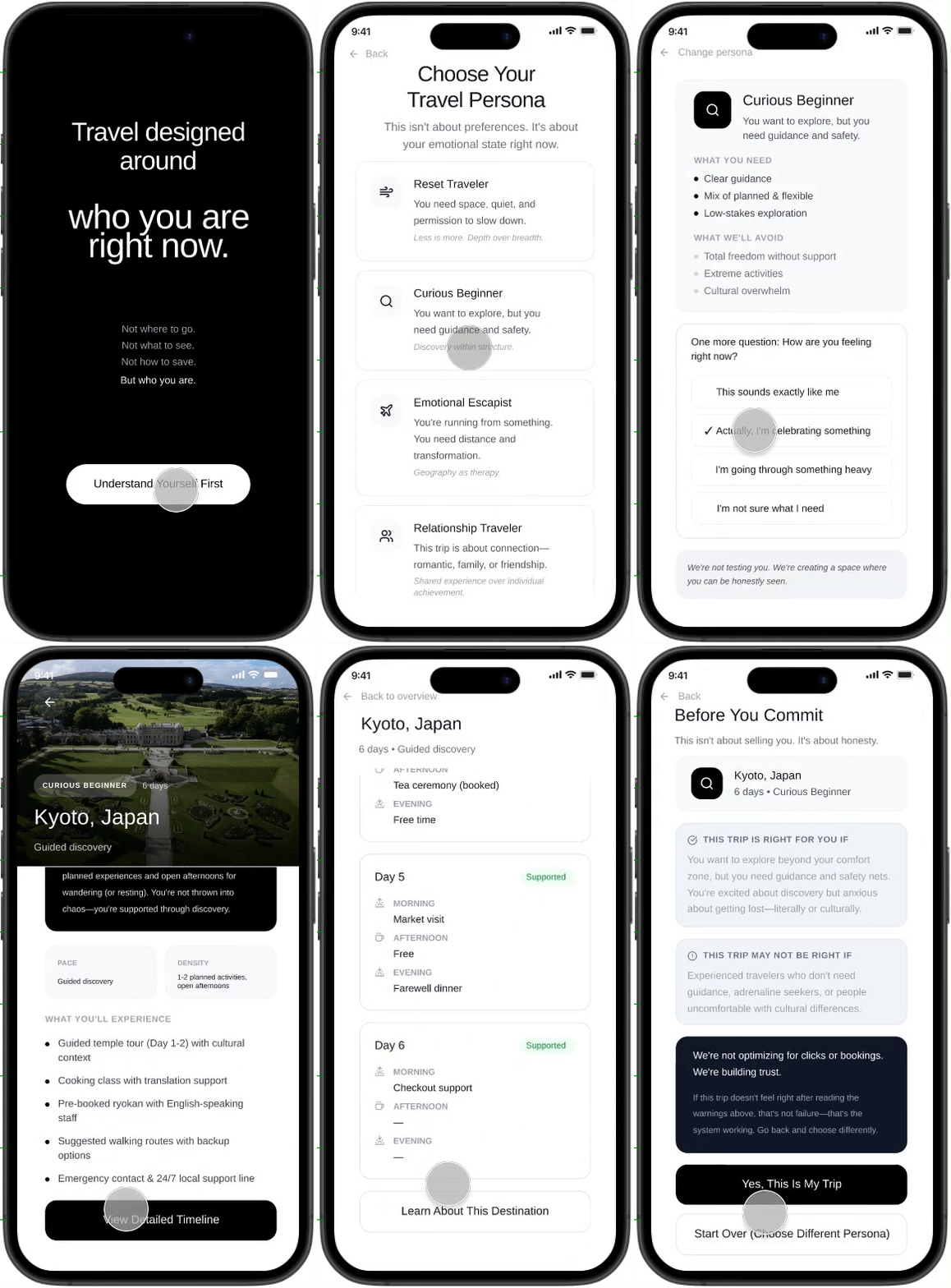
Hi-fi prototype
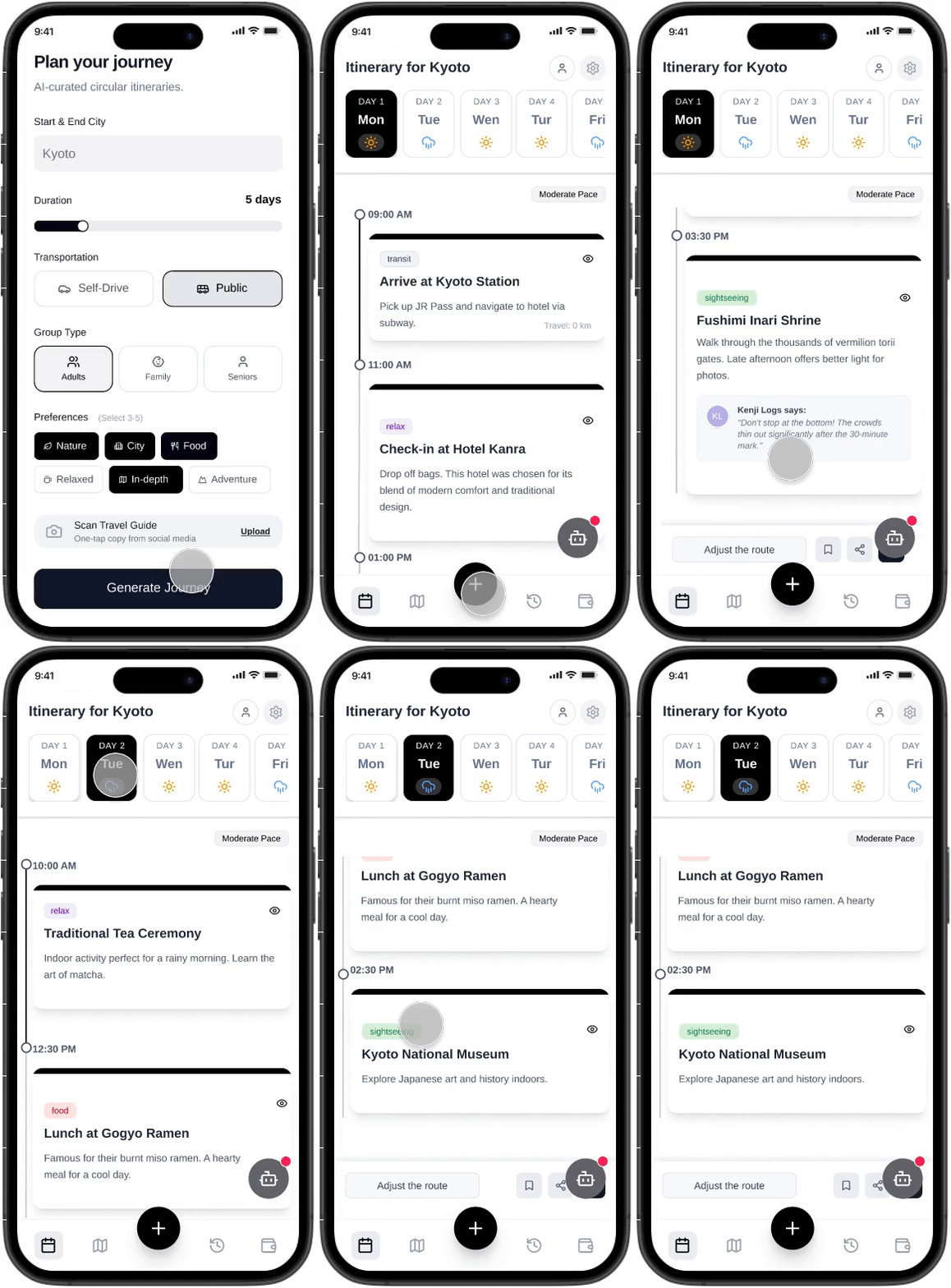
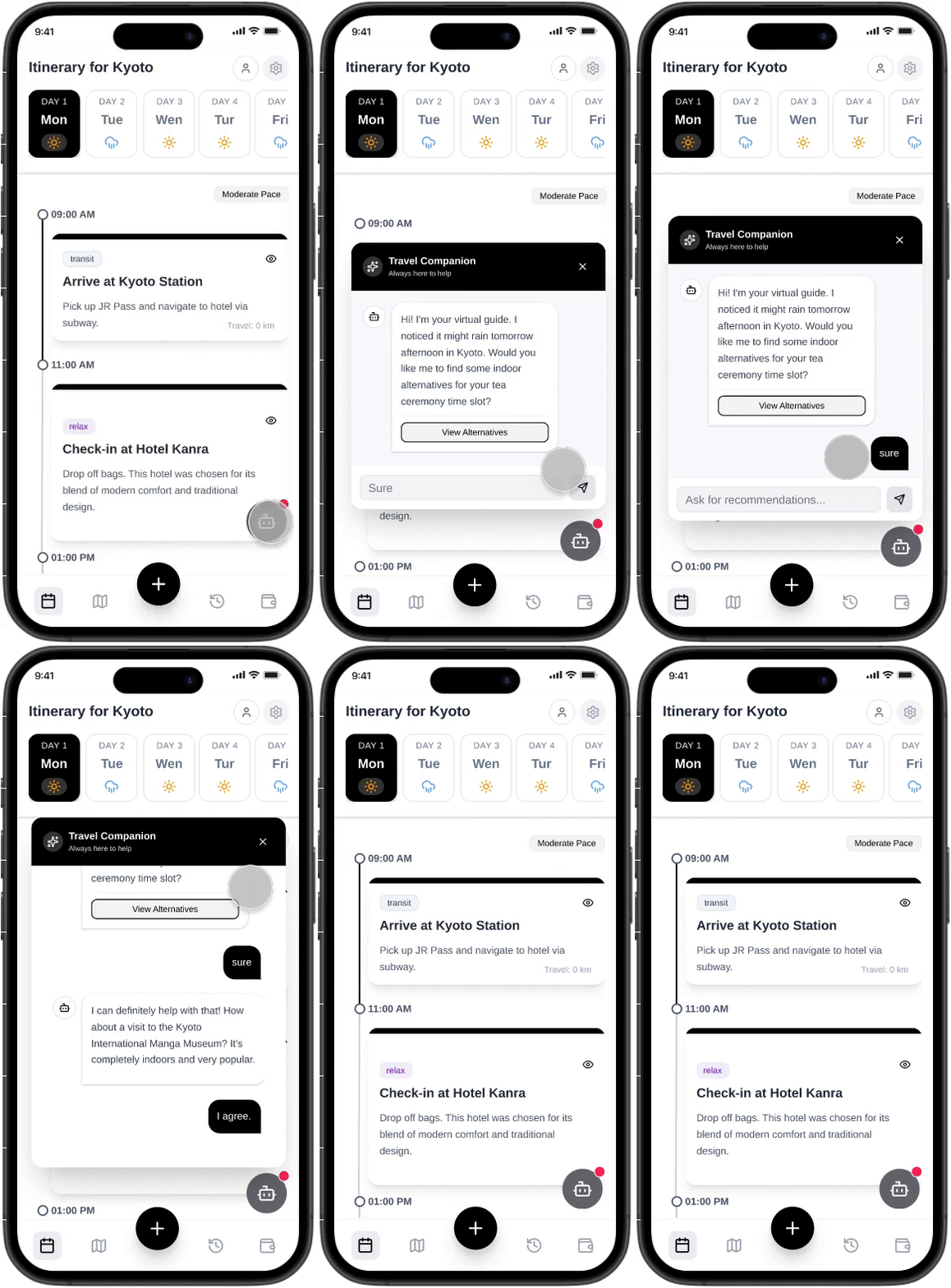
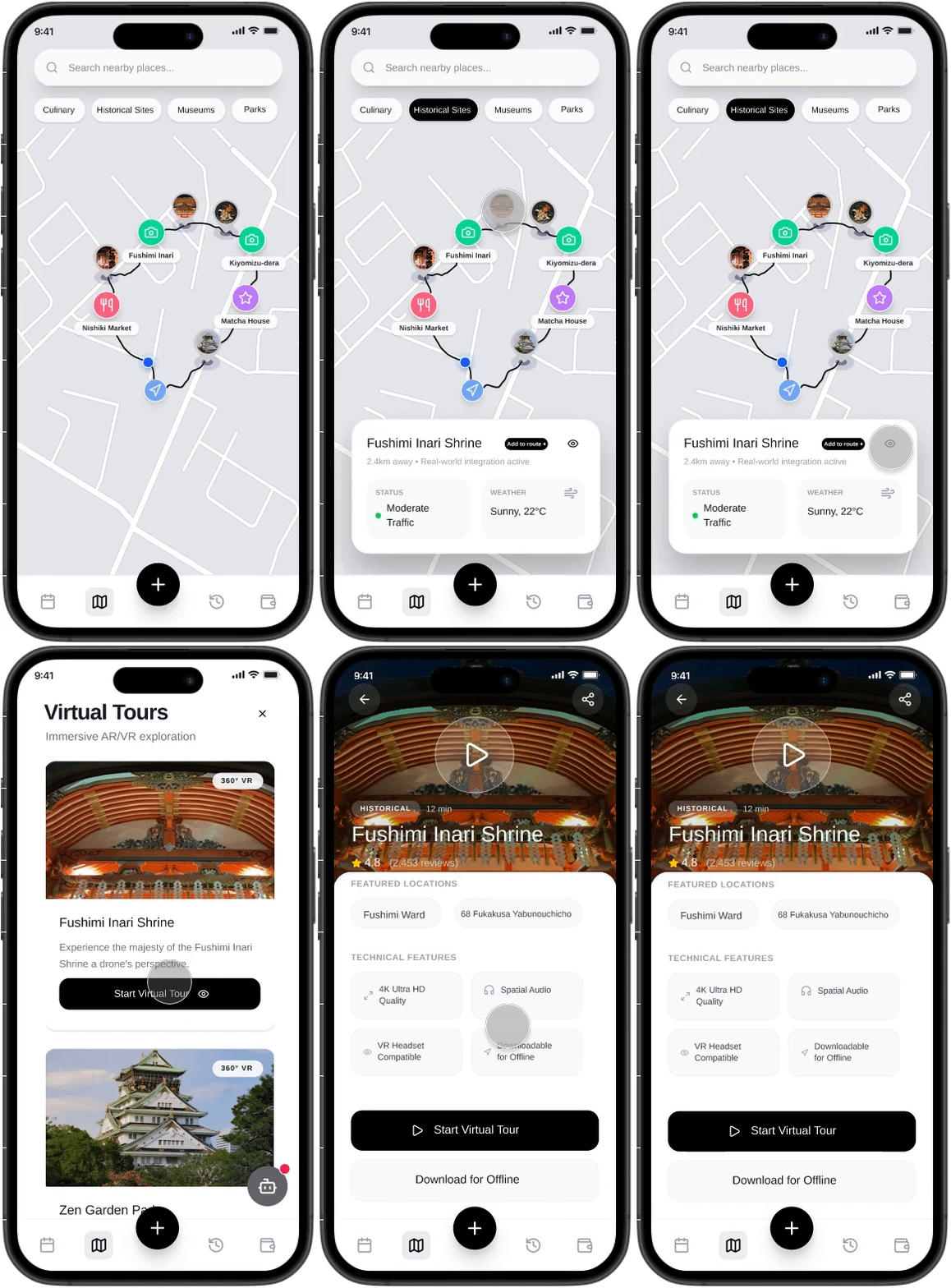
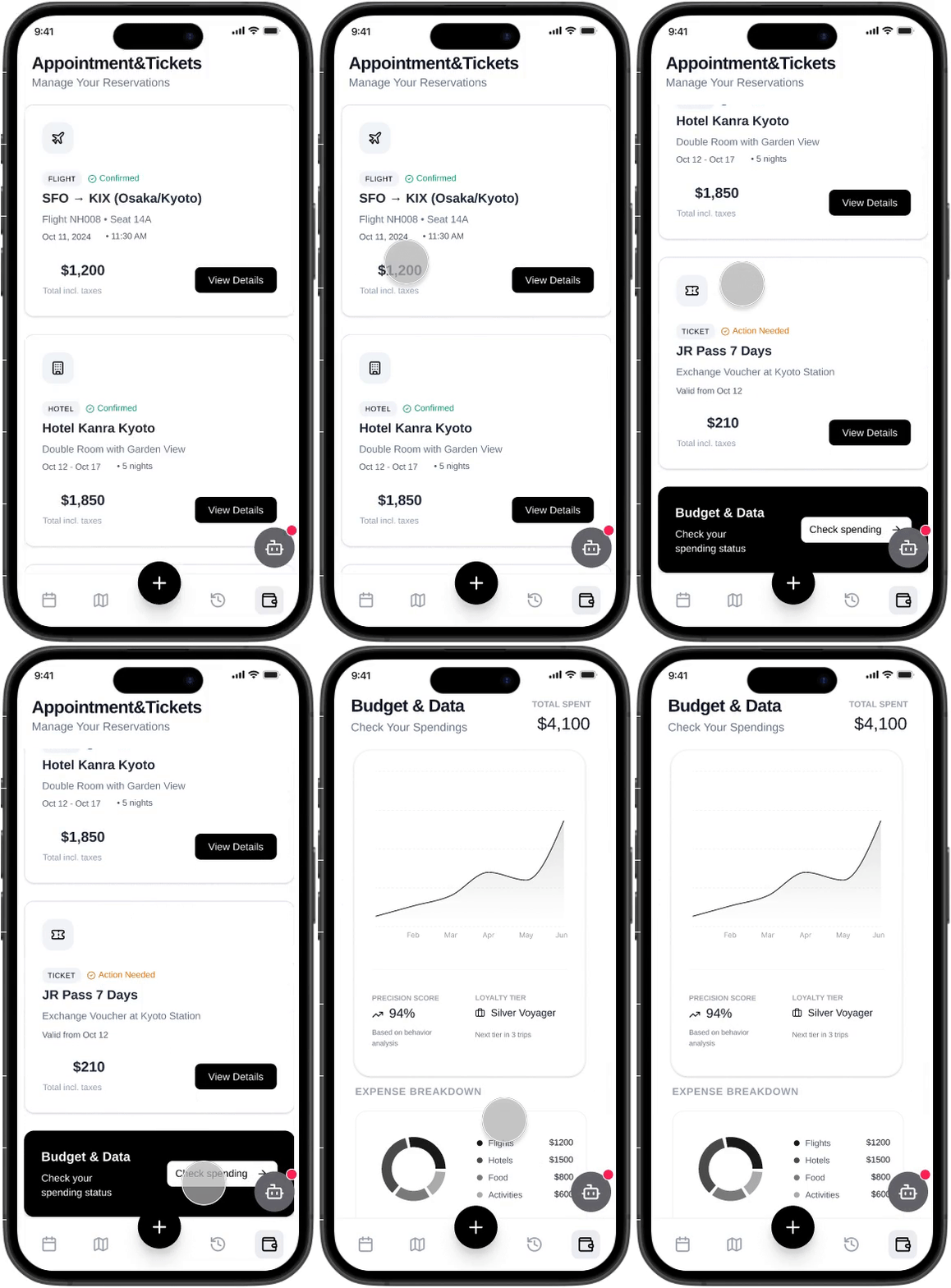
Day4 Test
To truly validate design feasibility from the user's perspective, I conducted six user testing interviews targeting individuals . All test participants were drawn from the same user group identified in the initial round of interviews. Each session was conducted remotely via Tencent Meeting, requiring users to share their screens and interact with the application through Figma prototype links. This testing aimed to comprehensively identify usability issues while refining feature positioning and ensuring tangible fulfillment of user requirements.
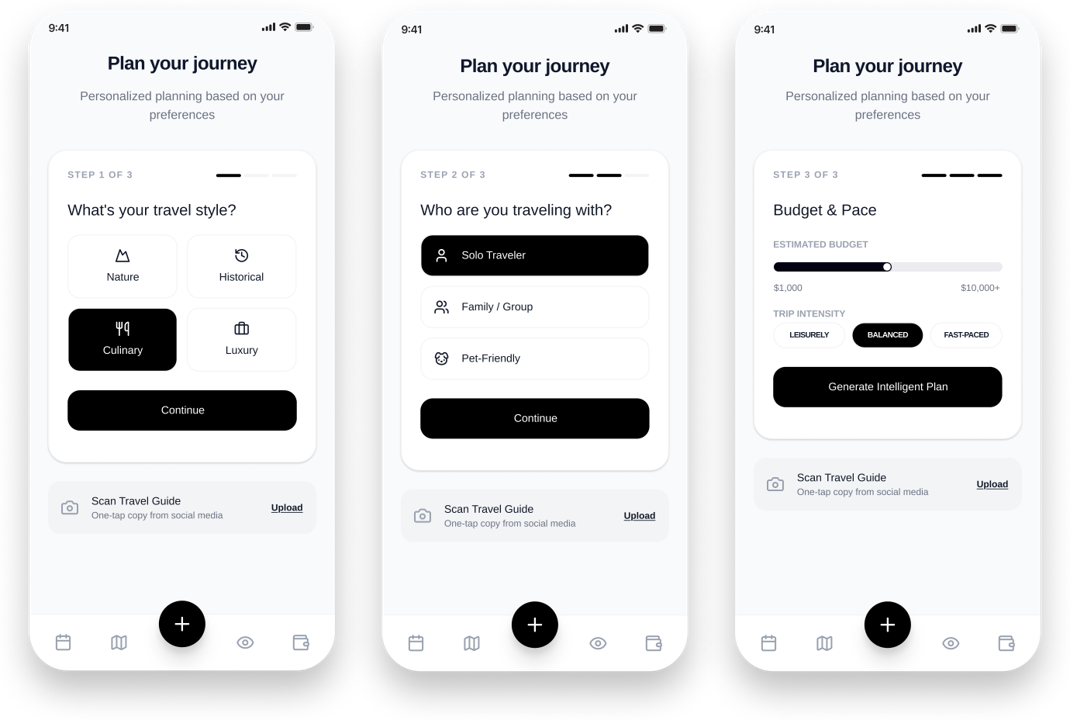
Iteration on Preference input page
On the input preferences interface, users believe that a single interface can sufficiently gather all the information needed to generate the journey, eliminating the need to split it into three sections.
Version1
Version2
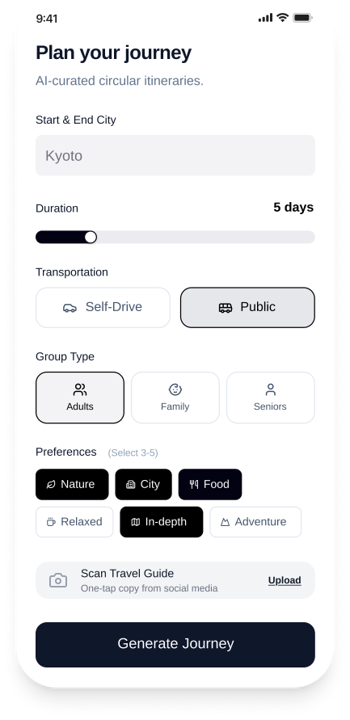
Version2
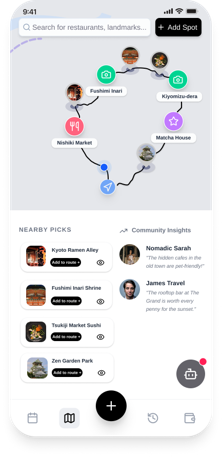
Iteration on Preference input page
The initial design failed to allow users to instantly identify featured restaurants and sites on the map. In the second iteration, I adopted a larger view to enable users to grasp information at a glance. Simultaneously, I placed crowd density indicators for attractions and real-time weather monitoring icons in the most prominent positions within the card view, facilitating informed decision-making for users.
Version1
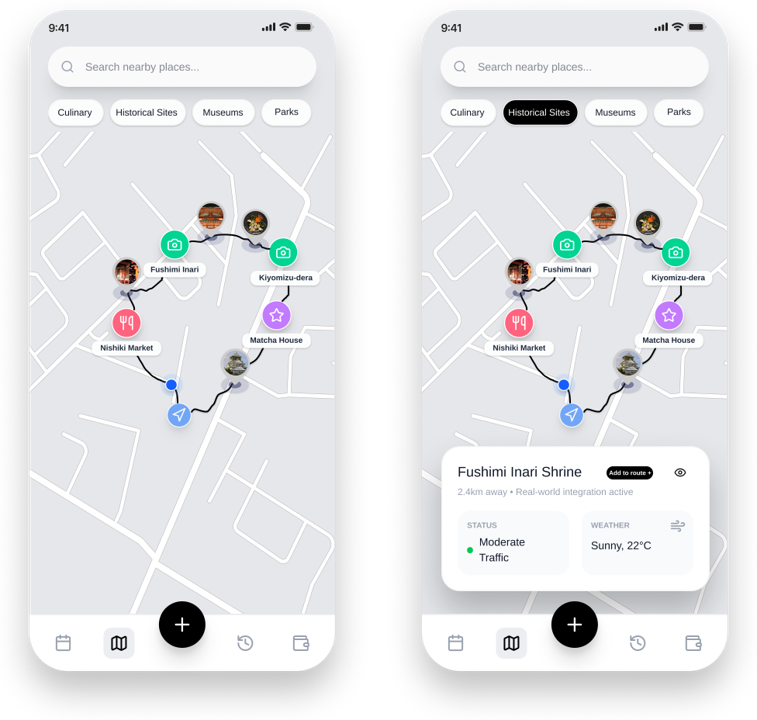
The final high-fidelity prototype demonstrated Wander Trip AI's core positioning as a travel planner—where the AI serves as a decision-maker rather than merely an information provider. The ultimate goal is for users to experience this psychological response after reviewing itineraries: “This split itinerary is backed by scientific analysis; I can genuinely adopt it.”
Takeaways
I relish the process of bringing ideas to life in a short span of time. This journey has taught me: there's no need to fear wildly imaginative concepts, no need to overthink every detail, no need to dread making mistakes, and certainly no need to shy away from repeated refinement. Especially when practicing the Crazy Eight method, I initially hesitated to sketch out solutions, worried they might not be comprehensive enough or that the process wouldn't be practical. But when I finally committed to roughly sketching out every idea that came to mind, then reviewed, refined, and adjusted them the next day, the viable product that emerged gave me confidence. While this process inevitably involved a lot of lateral thinking, conversations with users continually brought my ideas back to their original purpose. This journey taught me to use vertical thinking to rationally solve problems.